
The Rise of AI in Home Security: Beyond Basic Motion Detection
For years, home security meant little more than a loud alarm and maybe a flashing light. Those systems reacted after a break-in occurred. Now, we’re seeing a fundamental shift. AI is moving us towards proactive security, systems that can identify threats before they escalate. It's not just about detecting movement anymore; it’s about understanding what is moving and whether it poses a risk.
The early days of "smart’ home security were often a bit of a misnomer. A lot of systems just added Wi-Fi connectivity without truly leveraging the power of artificial intelligence. Too often, that meant a flood of false alarms triggered by pets, shadows, or even swaying trees. This led to ‘alarm fatigue" and a general distrust of these systems. The new generation of AI-powered systems actually learns and adapts, drastically reducing those false positives.
The difference lies in the ability to analyze data – not just detect it. Traditional systems see "motion." AI systems can differentiate between a person, a car, an animal, or a package. This level of discernment is what separates a basic security system from a truly intelligent one. We've moved beyond simple triggers to complex event recognition. It's a leap forward, and the benefits extend beyond just preventing burglaries.
Looking back, the evolution is clear. From simple mechanical locks to wired alarm systems, then to wireless options, and now to AI-driven protection—each step has built upon the last. But this isn’t just incremental improvement; it’s a qualitative change. AI isn’t just making security systems smarter; it’s making them predictive.
Understanding AI Security Features: What Can These Systems Actually Do?
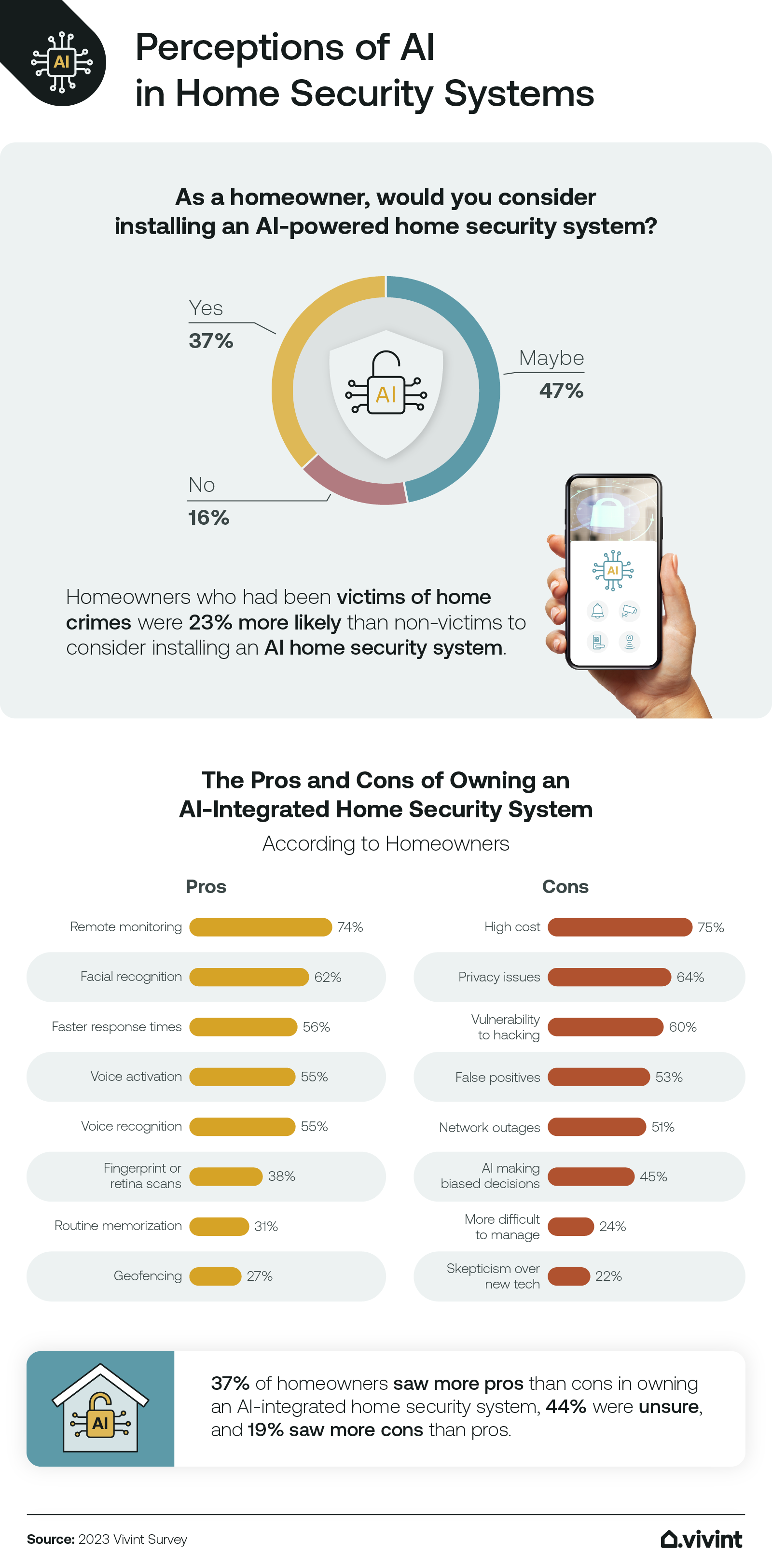
So, what exactly do these AI-powered features do? Let’s break down some of the core capabilities. Person detection is a big one. The system can identify if a human is on your property, ignoring movements from animals or vehicles. Similarly, package detection alerts you when a delivery arrives, which is incredibly useful in combating porch piracy. These aren’t just convenient features; they enhance security by focusing attention on genuine threats.
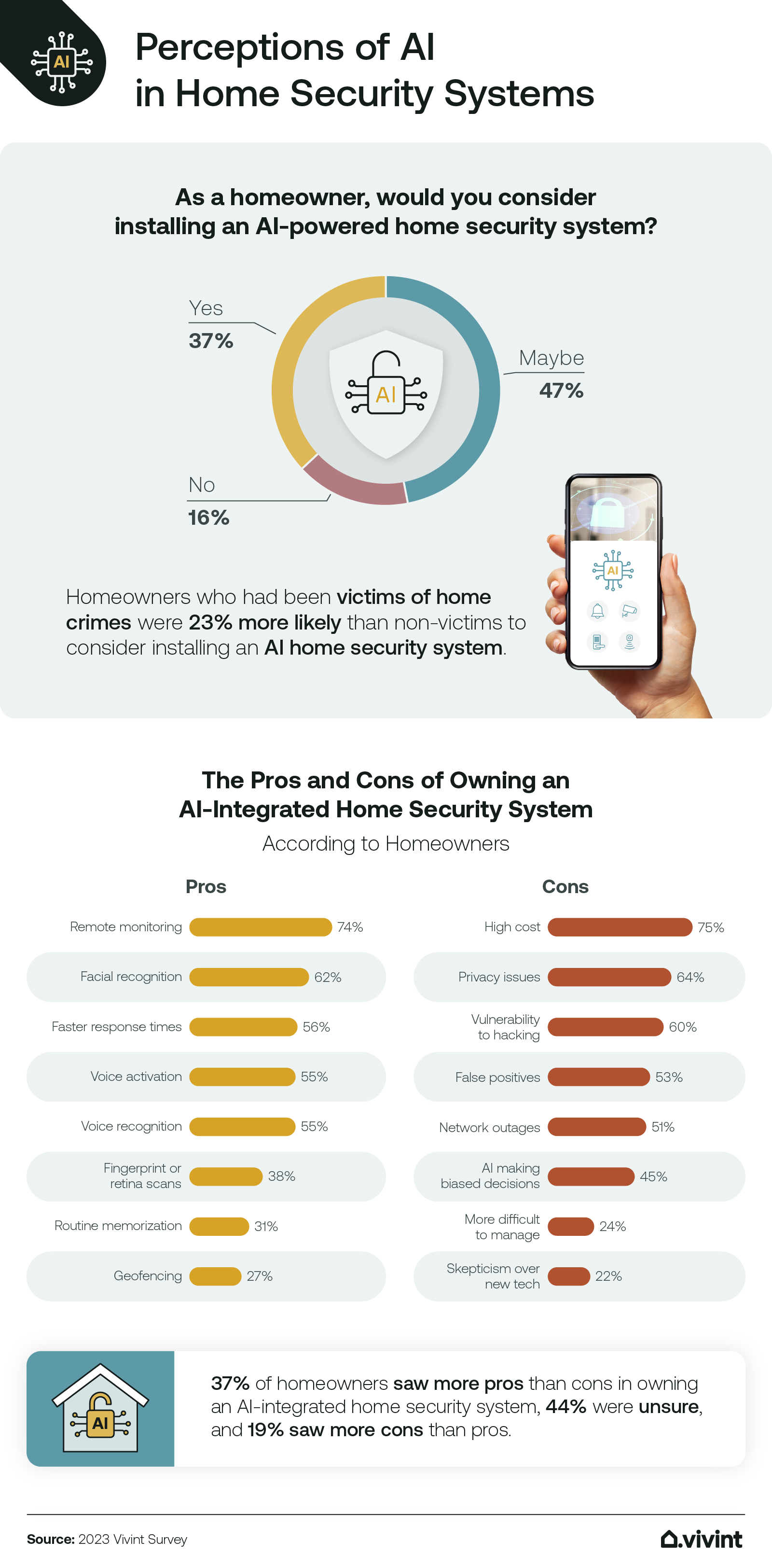
Facial recognition is a more complex topic. Some systems offer the ability to learn the faces of family members and trusted visitors, alerting you to the presence of strangers. However, this feature raises significant privacy concerns – and rightly so. Check how the system stores this data and opt-out if you aren't comfortable with the privacy trade-off. Systems like Brinks Home offer this, but transparency is key.
Anomaly detection is another powerful capability. The system learns your typical patterns of activity – when lights are on, when doors are opened, when people are usually home – and flags anything that deviates from the norm. This could indicate a potential break-in, a medical emergency, or simply a forgotten door. It's a subtle but powerful layer of protection.
The main difference is where the AI processing happens: at the "edge’ or in the ‘cloud". Edge processing means the analysis is done directly on the camera or security panel, offering faster response times and greater privacy. Cloud processing sends the video feed to a remote server for analysis. VOLT.ai, for example, emphasizes cloud-based AI, which allows for more complex algorithms but relies on a stable internet connection.
- Person Detection: Distinguishes humans from other moving objects.
- Package Detection: Alerts you to deliveries.
- Facial Recognition: Identifies known individuals (with privacy considerations).
- Anomaly Detection: Flags unusual activity.
Top AI Home Security Systems of 2026: A Head-to-Head Comparison
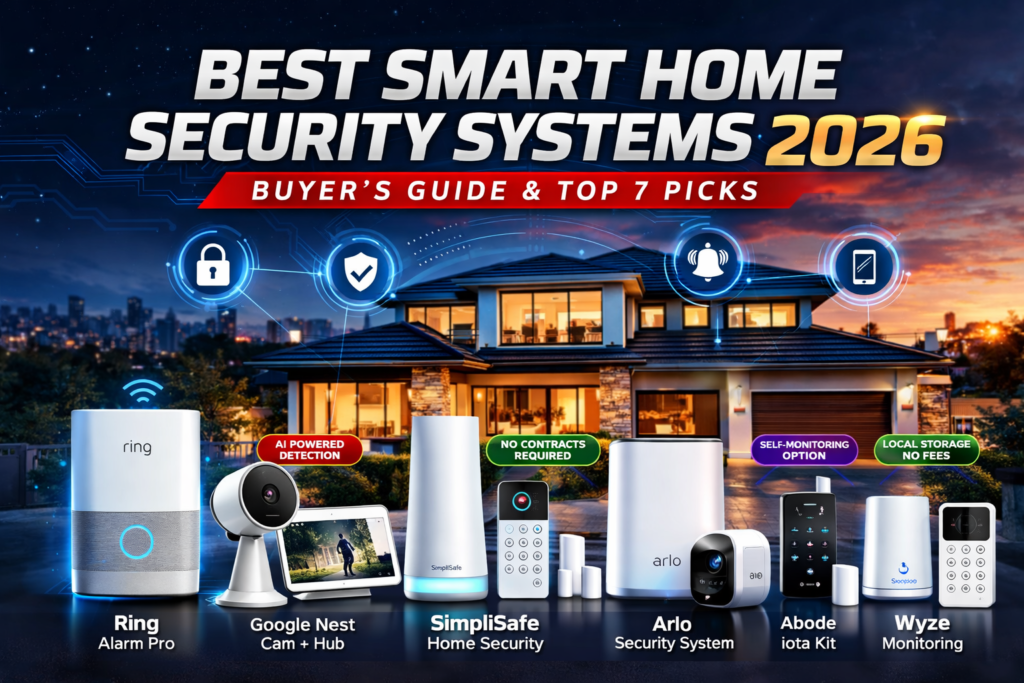
The market for AI-powered home security is growing rapidly, with a lot of options available. Brinks Home is a major player, offering a comprehensive system with professional monitoring and a wide range of AI features. Their system excels at person and package detection, and they’ve made strides in reducing false alarms. Installation can be a bit involved, but their professional monitoring is reliable.
VOLT.ai is a newer entrant, focusing specifically on AI-powered security. Their strength lies in their sophisticated algorithms for threat detection, including weapons and violence detection – a feature particularly appealing to schools and businesses. They offer both self-monitoring and professional monitoring options, with a subscription-based pricing model. However, their system is heavily reliant on a stable internet connection.
ENS Security is another strong contender, particularly for those seeking high-resolution camera options. They offer a range of IP cameras with built-in AI capabilities, including person and vehicle detection. They position themselves as a more customizable option, allowing users to build a system tailored to their specific needs. The downside is that it requires more technical expertise to set up and manage.
SimpliSafe, while historically known for its simplicity, has also integrated AI features. Their system is easy to install and use, making it a good choice for renters or those new to home security. However, their AI capabilities aren’t as advanced as those offered by Brinks or VOLT. Their focus remains on affordability and ease of use. Costs vary, but generally fall in the $20-$30 per month range for professional monitoring.
AI-Powered Home Security System Comparison - 2026
| System Provider | AI Feature Set | Privacy Features | Ease of Installation | Customer Support |
|---|---|---|---|---|
| Brinks Home | Good - Person, pet, and package detection reported. Advanced object recognition capabilities. | Fair - Data security practices are outlined, but independent audits are not widely publicized. | Good - Professional installation available, DIY options may be limited. | Good - 24/7 professional monitoring available, customer service ratings generally positive. |
| SimpliSafe | Good - Person detection and smart alerts. Expanding AI capabilities. | Good - Local processing options available with some systems, end-to-end encryption. | Excellent - Designed for DIY installation, user-friendly app. | Good - Responsive customer support, but wait times can vary. |
| ADT | Excellent - Comprehensive AI features including facial recognition (with subscription) and advanced analytics. | Fair - Privacy policies are standard, data usage details require careful review. | Fair - Typically requires professional installation. | Excellent - Well-established professional monitoring and support infrastructure. |
| Ring Alarm | Good - Person, package, and animal detection. Integrates with Ring's wider ecosystem. | Fair - Privacy concerns have been raised regarding data sharing with law enforcement; user control over data is improving. | Good - Relatively easy DIY installation, wide range of compatible devices. | Good - Active user community and responsive support channels. |
| Vivint | Excellent - Advanced AI-powered video analytics, smart home integration. | Fair - Data security measures in place, but reliant on cloud storage. | Fair - Professional installation required. | Excellent - Comprehensive support services, including proactive system monitoring. |
Illustrative comparison based on the article research brief. Verify current pricing, limits, and product details in the official docs before relying on it.
DIY vs. Professional Monitoring: Which is Right for You?
Many AI security systems give you a choice: self-monitoring or professional monitoring. Self-monitoring means you receive alerts directly on your smartphone and are responsible for contacting the authorities if necessary. It’s the more affordable option, typically costing nothing beyond the initial equipment purchase. However, it requires you to be constantly vigilant and able to respond quickly.
Professional monitoring, on the other hand, means a monitoring center is alerted when an alarm is triggered. They will attempt to verify the alarm and dispatch emergency services if needed. This provides an extra layer of security and peace of mind, especially if you’re traveling or unable to respond immediately. It comes with a monthly fee, typically ranging from $20 to $60, depending on the features and provider.
With the advancements in AI, the question arises: is professional monitoring still necessary? The answer isn’t straightforward. AI can significantly reduce false alarms, but it can’t replace the human element of verification. A professional monitoring center can assess the situation and make informed decisions, especially in complex scenarios. They can also contact you directly to confirm whether everything is okay.
For those comfortable with technology and able to respond quickly, self-monitoring might be sufficient. But for those seeking maximum security and peace of mind, professional monitoring remains a valuable option. Consider your lifestyle, your risk tolerance, and your budget when making your decision.
Privacy Concerns and AI Security: What You Need to Know
AI-powered security systems collect a lot of data—video footage, audio recordings, and potentially even facial recognition data. This raises legitimate privacy concerns. It’s crucial to understand how your data is being used, stored, and protected. Most reputable companies use encryption to protect your data in transit and at rest, but it's still important to review their privacy policies carefully.
Facial recognition is particularly sensitive. Some companies store facial data on your device, while others store it in the cloud. Cloud storage raises concerns about potential data breaches and unauthorized access. Look for systems that offer local storage options or allow you to opt-out of facial recognition altogether. VOLT.ai, for example, provides detailed control over data storage and usage.
Another concern is the potential for 'function creep'—where data collected for security purposes is used for other purposes, such as marketing or advertising. It’s important to choose a provider that is transparent about its data practices and committed to protecting your privacy. Read the fine print and understand what you’re agreeing to.
You can also take steps to protect your own privacy. Use strong passwords, enable two-factor authentication, and regularly update your system’s firmware. Be mindful of where you place your cameras and avoid recording areas where people have a reasonable expectation of privacy.
The Future of AI Home Security: What’s on the Horizon?
The field of AI home security is evolving rapidly. We can expect to see even more sophisticated threat detection algorithms in the coming years, capable of identifying subtle patterns of behavior that indicate a potential break-in. Predictive policing, using AI to anticipate crime patterns, is a controversial but emerging trend. The ethical implications of this technology need careful consideration.
Integration with smart city infrastructure is another area to watch. As cities become increasingly connected, security systems will be able to leverage data from other sources—traffic cameras, public sensors—to provide a more comprehensive view of the surrounding environment. This could lead to faster response times and more effective crime prevention.
The rollout of 5G will play a crucial role, providing faster and more reliable connectivity for security systems. This will enable real-time video streaming, more accurate AI processing, and seamless integration with other smart home devices. Edge computing will also become more prevalent, allowing for more processing to be done locally, reducing latency and improving privacy.
We’ll likely see AI systems become more proactive, not just reactive. They may be able to automatically adjust lighting, lock doors, and even contact authorities before a break-in occurs. The goal is to create a truly intelligent security system that anticipates and prevents threats, rather than simply responding to them.
Maximizing Your AI Security System: Tips and Best Practices
Investing in an AI security system is just the first step. To get the most out of it, you need to configure it properly and maintain it regularly. Optimal camera placement is crucial. Position cameras to cover entry points, walkways, and other vulnerable areas. Avoid placing cameras in direct sunlight or where they can be easily obstructed.
Setting up activity zones allows you to focus the system's attention on specific areas of your property. This reduces false alarms and ensures that you’re only notified about relevant events. Customize your alerts to receive notifications for the types of activity that matter most to you – person detection, package delivery, or unusual sounds.
Regularly updating your system’s firmware is essential for maintaining security and performance. Manufacturers often release updates to address vulnerabilities and improve AI algorithms. Don't ignore these updates. Also, test your system regularly to ensure that all components are functioning properly.
A common mistake is to assume the system is "set it and forget it.’ AI systems learn over time, so it’s important to monitor their performance and make adjustments as needed. Review your event logs to identify any patterns of false alarms or missed detections. Don’t be afraid to experiment with different settings to optimize your system"s performance.
No comments yet. Be the first to share your thoughts!