
Self-Install or Pro Install?
The initial appeal of a DIY home security system is undeniable. You’re looking at potentially significant cost savings, and you retain complete control over your system. However, that control comes with responsibility – and a time commitment. Properly installing a security system demands a certain level of technical skill, and a mistake can leave your home vulnerable.
Professional installation offers something different: peace of mind. Knowing that a trained technician has configured your system, tested every sensor, and ensured everything is working correctly is a comfort many homeowners find worthwhile. It’s about weighing those benefits against the upfront and ongoing costs. There isn’t a single 'best' approach; the ideal choice depends heavily on your individual needs, skills, and budget.
Ultimately, the decision isn’t just about money. It’s about your comfort level and how much you value convenience versus hands-on control. We’ll break down the costs and complexities of each option to help you make an informed decision.
DIY Security: The Cost Breakdown
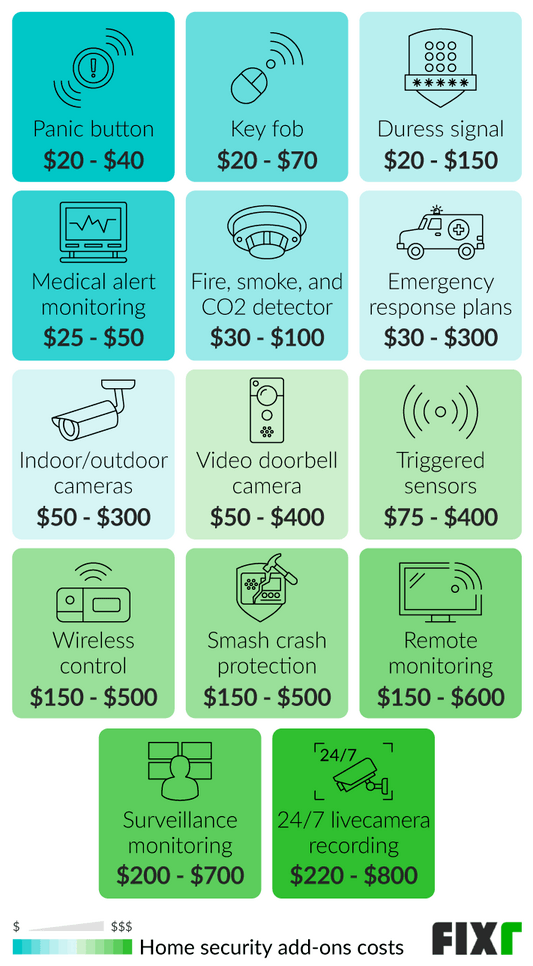
The cost of a DIY security system depends on your home's size, desired features, and brand. Primary expenses include equipment (control panel, sensors, cameras) and optional subscription fees for cloud storage or professional monitoring. You may also need to buy tools if you don't own them.
A basic DIY system for a small apartment with a few sensors and one camera costs about $150 to $300 upfront, according to SafeHome.org’s 2026 estimates. These often rely on self-monitoring via a smartphone app. Mid-range systems, with more sensors, indoor/outdoor cameras, and optional professional monitoring, typically cost $400 to $800.
Advanced DIY setups with video doorbells, smart locks, and extensive sensor coverage can cost over $1000. CNET’s 2026 testing found SimpliSafe starting around $229 and Ring Alarm at $200. Professional monitoring subscriptions typically range from $15 to $60 per month. Don't forget to budget for replacement batteries.
- Basic System (Apartment): $150 - $300 (upfront)
- Mid-Range System (Small Home): $400 - $800 (upfront), $15 - $30/month (monitoring)
- Advanced System (Larger Home): $1000+ (upfront), $30 - $60/month (monitoring)
Professional Installation: What You Pay For
Professional installation costs more, but covers expertise, system optimization, and ongoing support. Costs typically include an installation fee, equipment, and monthly monitoring.
ADT typically charges $99 to $299 for installation, depending on system complexity and location. Vivint often bundles equipment and installation into monthly plans of $50 to $150+, which lowers upfront costs but increases long-term expenses.
Monthly monitoring fees typically range from $30 to $70 and usually include 24/7 monitoring, cellular backup, and app access. Many providers require long-term contracts (36-60 months) with cancellation fees, so read the contract carefully.
Installation Difficulty: A Skill Assessment
Before choosing DIY installation, honestly assess your technical skills. Can you handle electrical wiring, use power tools for mounting, and confidently configure system settings via a smartphone app? If not, professional installation is likely a better option.
A poor DIY installation can lead to false alarms, wasting police resources and potentially annoying neighbors. Weak wireless signals create security gaps, and vulnerable configurations can make your system hackable.
Ask yourself: Do you understand basic wiring? Are you comfortable climbing a ladder? Can you accurately measure and mark sensor locations? Do you have a reliable internet connection? Hesitation on any of these suggests professional help is advisable.
Is DIY Security Installation Right For You?
Thinking about installing a home security system? Deciding between doing it yourself and hiring a professional can be tricky. This quick quiz will help you assess your skills and comfort level to determine the best path forward. Answer honestly to get a personalized recommendation!
Security System Standouts: DIY Options
The DIY market is crowded, but a few systems consistently receive high marks. SimpliSafe continues to be a popular choice, praised for its ease of installation and affordability. SafeHome.org’s 2026 review highlighted its flexible monitoring plans and comprehensive sensor options. Ring Alarm, integrated with Amazon’s ecosystem, offers seamless compatibility with other smart home devices and is known for its user-friendly app.
Abode, another strong contender, stands out for its customizable options and compatibility with a wide range of smart home integrations. CNET’s testing in 2026 noted its professional monitoring options and robust feature set. Eufy Security offers a unique approach with its wireless cameras and local storage options, eliminating the need for cloud subscriptions.
Each system has its strengths and weaknesses. SimpliSafe is great for beginners, Ring Alarm excels in smart home integration, Abode offers maximum customization, and Eufy prioritizes privacy. It’s crucial to research each option and choose the one that best aligns with your specific needs and preferences.
- SimpliSafe: Easy to install, affordable, flexible monitoring.
- Ring Alarm: Seamless smart home integration, user-friendly app.
- Abode: Customizable, professional monitoring options.
- Eufy Security: Wireless cameras, local storage, privacy-focused.
Featured Products

Wireless setup · Optional 24/7 professional monitoring · No contract required
This system provides a robust, contract-free DIY security solution with optional professional monitoring and smart home integration.

Expandable system · Easy setup · Mobile app control
The Ring Alarm offers a comprehensive and expandable DIY security kit with convenient mobile control and optional professional monitoring services.
Integrated camera, alarm, and sensors · DIY installation · Optional professional monitoring
The Abode Iota is an all-in-one DIY security solution featuring an integrated camera and broad smart home compatibility, with optional professional monitoring.

These top-rated DIY security systems offer a cost-effective and flexible alternative to professional installation, empowering homeowners to secure their properties with confidence.
As an Amazon Associate I earn from qualifying purchases. Prices may vary.
Potential Safety Gaps: DIY vs. Pro
DIY systems have improved, but gaps persist. Improper sensor placement (e.g., a motion detector triggered by a pet) causes false alarms. Weak wireless signals create blind spots. Poorly configured systems are vulnerable to hacking.
Professional installation reduces these risks. Technicians optimize sensor placement for maximum coverage and fewer false alarms, test signal strength with specialized tools, and configure systems using security best practices to prevent unauthorized access.
No system is foolproof; determined intruders can bypass security. Professionally installed systems are generally more robust and less prone to common vulnerabilities, with technician expertise enhancing overall security.
- DIY Risks: Improper sensor placement, weak wireless signals, system configuration vulnerabilities.
- Pro Benefits: Optimized sensor placement, strong signal testing, secure system configuration.
DIY vs. Professional Security Installation: Safety and Configuration Comparison (2026)
| Feature | DIY Installation | Professional Installation |
|---|---|---|
| Sensor Coverage | Medium - Coverage dependent on user planning and placement. Potential gaps if not thoroughly assessed. | High - Professionals assess vulnerabilities and ensure comprehensive coverage. |
| System Configuration | Medium - User-configured, requiring technical aptitude. Complexity can impact effectiveness. | High - Optimized configuration by trained technicians, ensuring all components work seamlessly together. |
| Wireless Signal Strength | Medium - Dependent on home layout and potential interference. User responsible for troubleshooting. | High - Professionals assess and mitigate signal interference, often utilizing signal repeaters if needed. |
| Response Time (Alarm Triggered) | Medium - Relies on self-monitoring or potentially slower response through monitoring subscriptions. User action required. | High - Typically faster response times through 24/7 professional monitoring services. |
| Ongoing Support | Low - Limited to manufacturer support and online resources. Troubleshooting is the user's responsibility. | High - Dedicated support from the security company, including technical assistance and system maintenance. |
| Integration with Smart Home Devices | Medium - Compatibility varies based on system and device. User responsible for integration. | Medium to High - Professionals can often facilitate smoother integration with existing smart home ecosystems. |
| System Customization | High - Highly customizable, allowing users to select specific components and features. | Medium - Customization options available, but may be limited by the provider’s standard packages. |
Illustrative comparison based on the article research brief. Verify current pricing, limits, and product details in the official docs before relying on it.
Long-Term Maintenance and Support
The maintenance requirements differ significantly between DIY and professional systems. With a DIY system, you’re responsible for everything – troubleshooting issues, updating software, replacing batteries, and ensuring the system remains operational. This requires ongoing effort and a willingness to learn.
Professional systems typically include ongoing support and maintenance as part of the monthly fee. This means you can rely on the provider to handle troubleshooting, software updates, and system repairs. It also provides peace of mind knowing that someone is monitoring your system 24/7. System upgrades and compatibility with new smart home devices can also be handled by the provider.
Looking ahead, compatibility could be a concern. As technology evolves, older systems may become obsolete or incompatible with newer devices. Professional providers generally handle these upgrades, while DIY users may need to replace entire systems to stay current.
- DIY Maintenance: Self-troubleshooting, software updates, battery replacements.
- Pro Maintenance: Provider support, 24/7 monitoring, system upgrades.
No comments yet. Be the first to share your thoughts!