

AI Security: Beyond Motion Detection
Traditional home security systems have always been a bit of a trade-off. They offer peace of mind, but often come with a frustrating number of false alarms – a blowing leaf, a passing car, even a curious pet can trigger an alert. This constant stream of notifications desensitizes you, and you risk missing the events that actually matter. It's a problem homeowners have dealt with for decades.
Artificial intelligence is changing that equation. We're moving beyond simple motion detection to systems that can intelligently analyze what's happening on your property. This means identifying what triggered the alert – a person, a vehicle, an animal, or a package – and only notifying you when something genuinely requires your attention. It's a shift from reacting to every movement to responding to meaningful events.
This isn’t just about smarter alerts, though. AI enables behavioral analysis, recognizing patterns and flagging anomalies. A person approaching your door at 3 AM is different than the mail carrier arriving at noon. The system learns what’s normal for your property, and can highlight anything out of the ordinary. It's a fundamental shift in how home security operates.
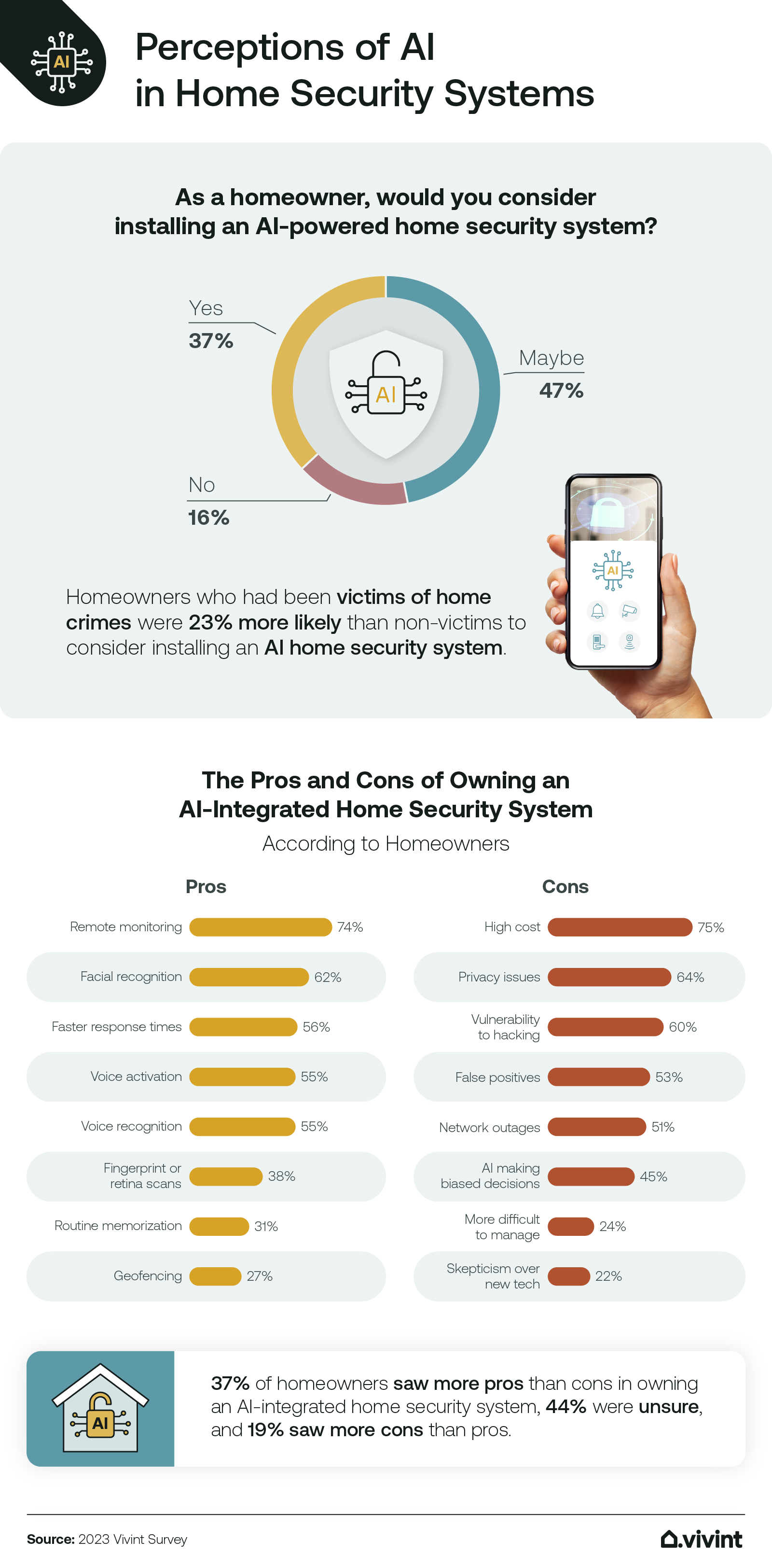
Of course, the rise of AI in security also raises valid privacy concerns. Data collection and facial recognition are areas that require careful consideration. It’s important to understand how these systems are using your data and whether adequate safeguards are in place to protect your privacy. Responsible AI development and transparent data practices are essential as this technology evolves.

Top AI Home Security Systems: 2026
The market for AI-powered home security is growing rapidly, with several companies offering compelling solutions. Here's a look at some of the top contenders as of 2026, with a focus on their AI capabilities and overall value. It’s important to remember that the "best" system depends heavily on your individual needs and budget.
Brinks Home has solidified its position as a leader, offering a comprehensive system with advanced AI features. Their system utilizes object detection to differentiate between people, vehicles, and animals, significantly reducing false alarms. Brinks also offers professional monitoring, which can be a valuable asset for many homeowners. However, the long-term contract requirements are something to consider. They’ve invested heavily in integrating AI directly into their monitoring centers, allowing for faster and more accurate responses.
SimpliSafe, traditionally known for its DIY simplicity, now offers AI-powered features through add-ons. Their Pro camera includes person detection and smart alerts, but the AI functionality is limited compared to Brinks. It's a good option for those who want a more affordable system with some AI capabilities, but don’t require the full suite of features. The flexibility of SimpliSafe’s monitoring plans is a definite plus.
Abode stands out for its open platform and compatibility with a wide range of smart home devices. Their AI features include person detection and package detection, and they offer a robust set of integrations with other smart home platforms. It's a good choice for tech-savvy users who want a highly customizable system. Abode’s flexibility comes with a slightly steeper learning curve.
Google Nest offers a seamless experience for those already invested in the Google ecosystem. Their Nest Cam (battery) utilizes AI to distinguish between people, animals, and vehicles, and offers intelligent alerts. While the AI is effective, it's tied to the Google ecosystem, which may be a drawback for some users. Google’s strength lies in its ease of use and integration with other Nest products.
Ring, backed by Amazon, provides a wide range of AI-powered security cameras and doorbells. Their systems offer person detection, package detection, and facial recognition (with a Ring Protect Plan). However, Ring has faced criticism regarding its data privacy practices, so it’s important to be aware of those concerns. Ring’s affordability and extensive product line make it a popular choice.
Kognition AI is a smaller player focused specifically on AI-powered video analytics. While geared more towards enterprise solutions, they're beginning to offer products for the high-end home market. Their strength is in exceptional AI accuracy and advanced analytics, but it comes at a premium price point. This is ideal for those who want the most advanced AI available.
Featured Products

1080p HDR video · Two-way talk · Built-in speaker and microphone
This camera offers powerful AI-driven threat detection with bright floodlights to deter intruders and provide clear video evidence.

14-piece kit · Wireless setup · Mobile app control
The Ring Alarm 14-Piece Kit provides a comprehensive and expandable security solution with easy mobile control and optional professional monitoring.

9-piece kit · Wireless setup · HD camera with night vision
SimpliSafe offers a flexible, contract-free security system with AI-powered features and seamless integration with popular smart home assistants.

2K HDR video · Wireless design · Rechargeable, removable battery
The Arlo Pro Security Camera system delivers crisp 2K HDR video and intelligent motion alerts, backed by an emergency response feature for enhanced peace of mind.

2.5K AI security camera · Indoor/outdoor use · Vibrant color night vision
WYZE Cam v4 provides advanced 2.5K AI security with impressive color night vision and no subscription fees, making it a cost-effective yet powerful option.
As an Amazon Associate I earn from qualifying purchases. Prices may vary.
AI Features Compared: What Can They Actually Do?
The promise of AI in home security is impressive, but it’s important to have realistic expectations. While these systems have come a long way, they’re not perfect. Let's break down some common AI features and discuss their current capabilities and limitations.
Person detection is now fairly reliable in most systems, but it’s not foolproof. Systems can sometimes misidentify objects as people, especially in low-light conditions or when the view is obstructed. CNET reported on their experience with AI filtering substantially reducing unnecessary alerts, but even those systems aren't immune to errors. The accuracy also varies depending on the camera's resolution and the quality of the AI algorithm.
Pet detection is another common feature, but it can be less accurate than person detection. Smaller pets, or pets that move quickly, can sometimes be missed. Some systems allow you to define "safe zones’ to ignore pet activity in certain areas, which can help reduce false alarms. It"s a helpful feature, but it requires some fine-tuning.
Vehicle detection is useful for identifying cars approaching your driveway, but it can also be triggered by other moving objects. It's most effective when combined with other AI features, such as person detection, to differentiate between a person walking near a car and a car simply driving by. This feature is particularly useful for monitoring driveways and garages.
Package detection is a relatively new feature, and its reliability varies significantly between systems. Some systems struggle to accurately identify packages, especially if they’re partially obscured or if the lighting conditions are poor. It's a promising feature, but it’s still under development. Many systems rely on identifying a stationary object of a certain size and shape, which can lead to false positives.
Facial recognition, when offered, raises significant privacy concerns. The accuracy of facial recognition varies depending on the system and the quality of the image. It’s also important to be aware of the potential for bias in AI algorithms, which could lead to misidentification.
AI-Powered Home Security System Comparison - 2026
| System Name | Person Detection Accuracy | Pet Detection Accuracy | Package Detection | Facial Recognition | Anomaly Detection |
|---|---|---|---|---|---|
| SimpliSafe | High | Medium | Yes | Optional | Yes |
| Ring Alarm Pro | High | Medium | Yes | Optional | Yes |
| Google Nest Aware | High | Medium | Yes | Yes | Yes |
| Brinks Home | Medium | Low | Limited | No | Yes |
| Abode | Medium | Medium | Yes | Optional | Yes |
| Vivint | High | Medium | Yes | Yes | Yes |
Illustrative comparison based on the article research brief. Verify current pricing, limits, and product details in the official docs before relying on it.
Privacy and AI Security: A Necessary Conversation
The use of AI in home security inevitably raises privacy concerns. These systems collect and analyze data about your property and your activities, and it’s essential to understand how that data is being used and protected. Transparency from security companies is paramount.
Data storage and encryption are critical considerations. Reputable companies should encrypt your data both in transit and at rest, and they should have clear policies regarding data retention. It’s also important to understand where your data is being stored and who has access to it. Look for companies that offer end-to-end encryption for video footage.
Facial recognition is particularly sensitive, as it involves the collection and storage of biometric data. If a system offers facial recognition, it’s important to understand how the data is being used and whether you have the option to opt out. Some jurisdictions have regulations governing the use of facial recognition technology.
The potential for bias in AI algorithms is another concern. AI systems are trained on data, and if that data is biased, the AI system may perpetuate those biases. This could lead to false positives or discriminatory outcomes. It’s important to choose a company that is committed to developing fair and unbiased AI algorithms. Resources like the Electronic Frontier Foundation () offer information about data privacy rights and regulations.
Installation and Integration: DIY vs. Professional
The installation process varies significantly between different AI home security systems. Some systems are designed for DIY installation, while others require professional installation. Your technical skills and comfort level will play a role in your decision.
Systems like SimpliSafe and Abode are generally considered DIY-friendly. They come with clear instructions and require minimal tools. However, even with DIY installation, you may need to drill holes and run wires, which can be challenging for some users. Professional installation is available for an additional fee.
Brinks Home and ADT typically require professional installation. This ensures that the system is installed correctly and that all components are functioning properly. Professional installation can be more expensive upfront, but it can save you time and frustration in the long run.
Integration with other smart home platforms is another important consideration. Most AI security systems are compatible with Amazon Alexa and Google Assistant, allowing you to control your system with voice commands. Compatibility with Apple HomeKit is less common, but it’s becoming increasingly available. Ensure the system you choose integrates with the smart home devices you already own.
Cost Breakdown: Beyond the Upfront Price
The total cost of ownership for an AI home security system extends beyond the initial price of the equipment. You also need to factor in monthly subscription fees, potential installation costs, and ongoing maintenance expenses.
Upfront equipment costs can range from a few hundred dollars for a basic DIY system to over a thousand dollars for a professionally installed system with advanced features. The cost will depend on the number of cameras, sensors, and other components you choose. Brinks and ADT typically have higher upfront costs due to professional installation and more robust equipment.
Monthly subscription fees are typically required for professional monitoring and access to advanced AI features. These fees can range from $20 to $60 per month, depending on the features included. SimpliSafe offers a range of monitoring plans to fit different budgets. Consider whether you need 24/7 professional monitoring or if you're comfortable self-monitoring.
Professional installation can add several hundred dollars to the upfront cost. Ongoing maintenance costs may include battery replacements and occasional repairs. It's important to factor all of these costs into your budget to get a clear picture of the total cost of ownership.
Total Cost of Ownership: AI Home Security Systems (36-Month Subscription)
Data: AI-generated estimate for illustration
Future Trends: What's Next for AI Home Security?
The field of AI home security is constantly evolving. Several emerging trends are poised to shape the future of this technology. One key trend is edge computing, which involves processing data locally on the device instead of in the cloud. This can improve response times and reduce privacy concerns.
Improved anomaly detection algorithms are also on the horizon. These algorithms will be able to more accurately identify unusual activity and reduce false alarms. We can expect to see systems that learn your routines and habits more effectively, leading to more personalized security. The goal is to minimize disruption while maximizing protection.
Integration with other smart home devices will continue to deepen. Expect to see more seamless integration between security systems, smart locks, smart lighting, and other smart home components. This will allow for more automated and coordinated security responses. Imagine your lights automatically turning on when a person is detected on your property.
Ultimately, the potential for AI to predict and prevent crime is a long-term goal. By analyzing data and identifying patterns, AI could potentially help law enforcement agencies prevent burglaries and other crimes. However, this raises ethical considerations that need to be addressed carefully.
What AI feature would you most like to see in your home security system?
As AI-powered security systems continue to evolve, we want to know which intelligent features matter most to you. Your input helps us focus our reviews and comparisons on what homeowners actually care about. Vote below!
No comments yet. Be the first to share your thoughts!